With the Unified Security Operations Platform (USOP), Microsoft introduces Unified Detections - a single detection framework spanning both Sentinel and Defender XDR data. Pair this with native Sentinel Data Lake ingestion for XDR tables, and you have a compelling cost-optimization story. But is it ready for prime time? Let’s dive into the capabilities, current limitations, and what it means for your detection strategy.
Architecture Overview
Previous Detection Architecture
In the ‘previous’ architecture, detections were created and managed separately for Microsoft Sentinel and Microsoft Defender XDR. This often led to overhead in terms of ‘where to create the detection’. Let’s take the use-case of IoC (Indicators of Compromise) based detections. Previously, if a security team wanted to create a detection based on IoCs imported via TAXII into Sentinel and the DeviceNetworkEvents table, they would need to ingest the DeviceNetworkEvents data into Sentinel as well and create the detection rule there. Furthermore, many MSSPs leveraged this pattern to create custom detections for their customers across Defender Advanced Hunting Data.
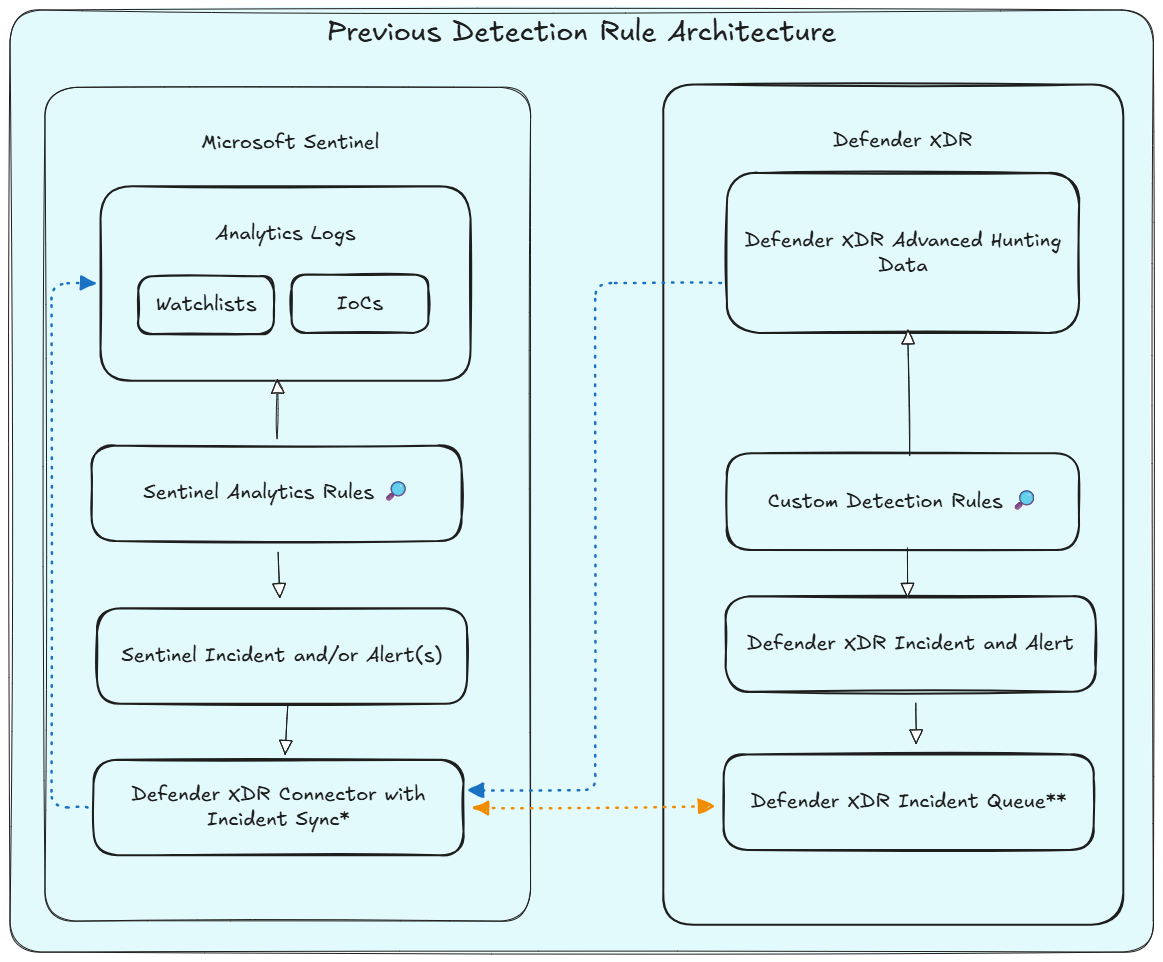
As part of the USOP onboarding, the following effects come into play, marked with an asterisk above:
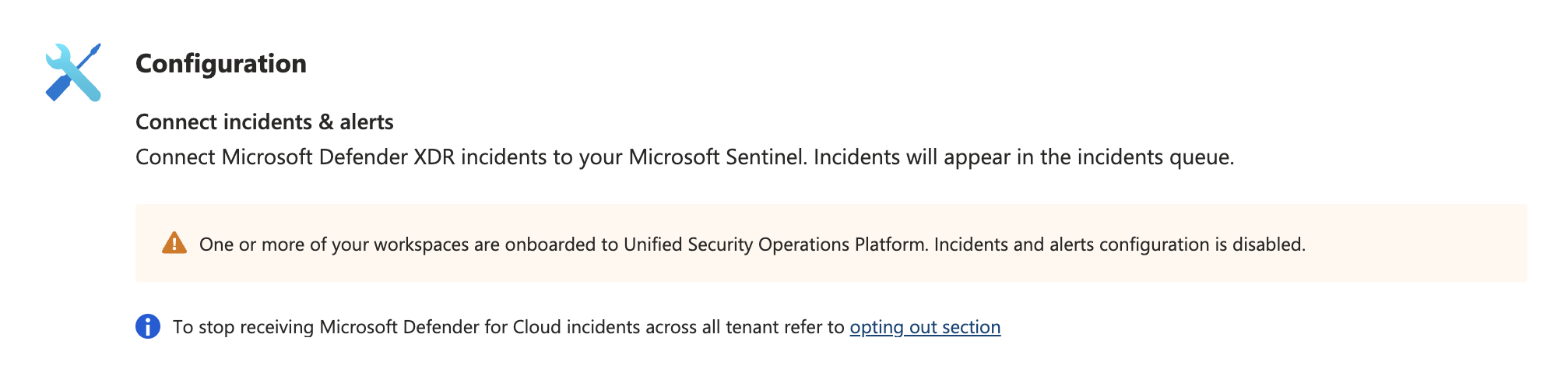
* The Microsoft Defender XDR data connector is enabled automatically (for incident synchronization) if you onboard your Microsoft Sentinel workspace to Defender XDR (USOP).
** Defender XDR performs the correlation of incidents and alerts. (Prior to USOP this was Microsoft Sentinel)
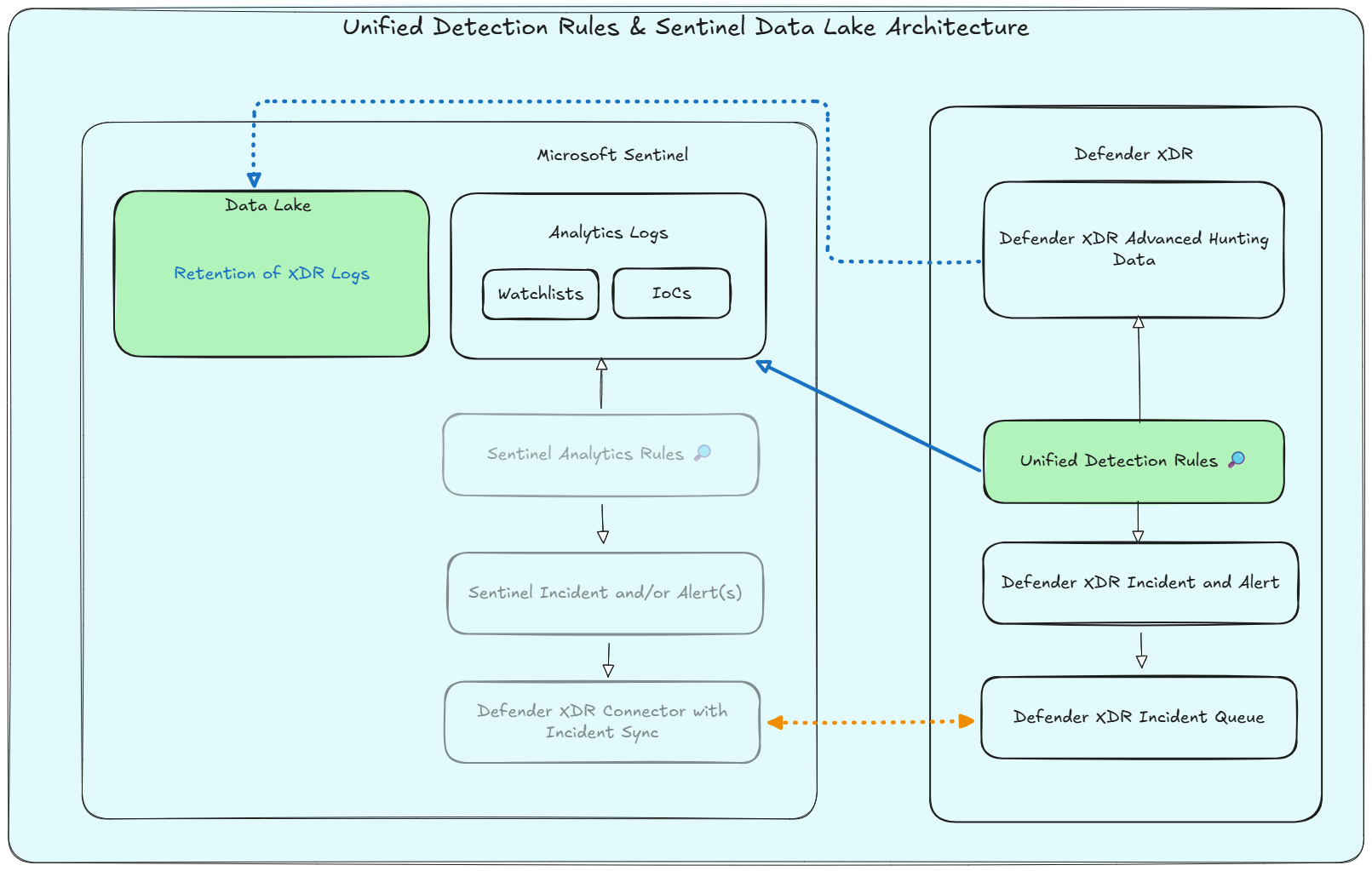
New Unified Detection Architecture
With the introduction of Unified Detections, security teams can now create detections that work seamlessly across both Microsoft Sentinel and Microsoft Defender XDR. This unified approach simplifies rule management, ensures consistency in detection logic and provides native response capabilities to take actions on devices, files, users, or emails. Furthermore, we can combine this with the new Sentinel Data Lake in terms of data retention for defender advanced hunting data.
But are these capabilities enough to replace existing Sentinel Analytics rules? Should you consider migrating all your existing detection rules to Unified Detections? Let’s take a closer look.
Unified Detections Dismantled
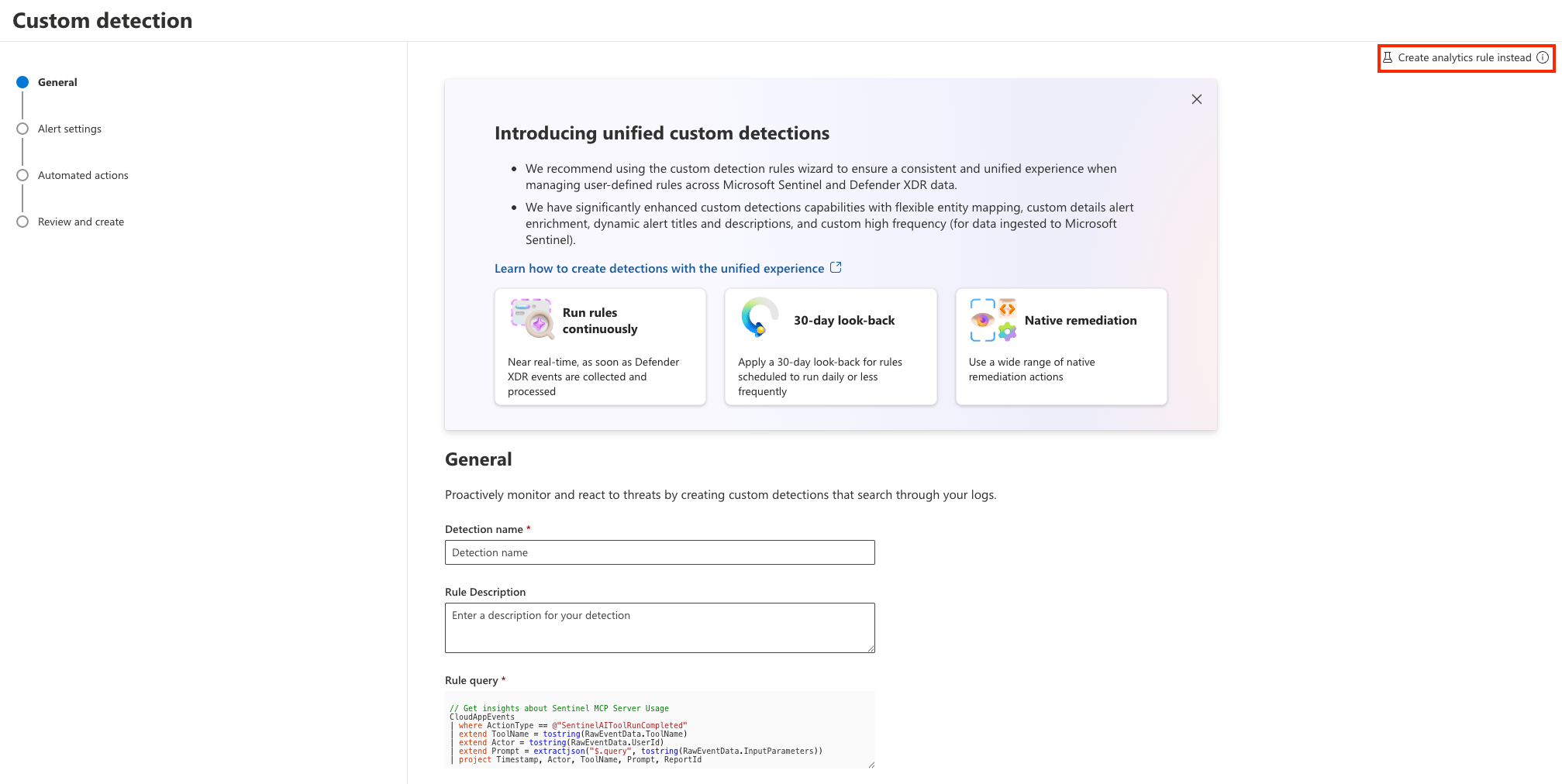
New Default Behavior in USOP
When working in USOP and want to move from an advanced hunting query to a detection, you will be prompted to create a Unified Detection by default:

If this option is greyed out, despite your workspace being onboarded to USOP, this is mostly due to missing RBAC permissions, because for unified detections querying Sentinel and Defender XDR data, you need to have permissions1 on both sides.
- Sentinel Contributor (Azure RBAC)
- Security Operator (Entra ID) and the ‘Security settings (manage)’ (Defender XDR RBAC) Permissions
And you’ll be greeted by the Unified Detection creation experience:
Feature Comparison
If we consult the official documentation2 and compare the features, we currently see that some of the capabilities are not yet available for Unified Detections, while others are planned for future releases. Below is a summary of the current status of various capabilities comparing Sentinel Analytics rules and Defender XDR Unified Detections:
| Capability | Status |
|---|---|
| Custom detections | Planned |
| Link multiple MITRE tactics | Planned |
| Support full list of MITRE techniques and subtechniques | Planned |
| Define all alerts properties dynamically - Integrate query results in runtime | Planned |
| Near-real-time (NRT) rules on Sentinel data | Available (See notes below!) |
| Determine rule’s first run | Not supported |
| Sentinel automation rules with incident trigger | Planned |
| Sentinel automation rules with alert trigger | Planned |
| Rules health logs available in advanced hunting | Planned |
| Customize alert grouping logic | Not supported |
| Choose between all events under one alert and one alert per event | Not supported |
| Exclude incidents from correlation engine - Ensure that incidents from different rules remain separated | Planned |
| Create alerts without incidents | Not supported |
| Alerts suppression - Define alert suppression after the rule runs | Not supported |
| Rerun rule on demand on a previous time window | Planned |
| Health and quality workbooks | Planned |
| Integration with Sentinel repositories | Planned |
| Bicep support | Planned |
| Create rules from content hub | Planned |
| Create custom detections on any workspaces onboarded to Defender | Planned |
| Cross workspaces detection using the workspace operator | Planned |
| Rule simulation from the rule’s wizard | Planned |
Below we will discuss some of the key differences and limitations, which I believe are important to consider when evaluating the use of Unified Detections for your security operations.
APIs
Whilst this might be obvious, it’s worth mentioning that Sentinel Analytics rules and Defender XDR Unified Detections use different API endpoints for creation and management, referring to Azure and the ARM (Azure Resource Manager) API and Defender XDR and the Microsoft Graph Security API respectively.
Azure Resource Manager (ARM):
PUT https://management.azure.com/subscriptions/{subscriptionId}/resourceGroups/{resourceGroupName}/providers/Microsoft.OperationalInsights/workspaces/{workspaceName}/providers/Microsoft.SecurityInsights/alertRules?api-version=2025-09-01Microsoft Graph Security:
https://graph.microsoft.com/beta/security/rules/detectionRules
This results in different schemas for payloads, permissions for API calls and potential changes to existing automation and deployment pipelines for Sentinel Analytics rules if you decide to migrate to Unified Detections.
Scheduling
Microsoft Sentinel uses a scheduling mechanism to run detection rules at specified intervals. This allows for timely detection of threats based on the latest data ingested into the Sentinel workspace. An important topic is to consider scheduling frequency in terms of ingestion delay from different data connectors and sources. By default, Sentinel Analytics rules filter data based on the TimeGenerated field, which represents the time when the event was generated. This means that if there is a delay in data ingestion, the rule may not capture all relevant events within the specified time window. Scheduling with a longer lookback period and filtering based on the ingestion_time() property can help mitigate this issue, while introducing potential duplicate alerts.
For Defender XDR Unified Detections, Microsoft defined default scheduling- and lookback intervals and uses integrated logic to deduplicate alerts based on alert properties. Besides that, we can also define custom scheduling for Sentinel data (minutes, hours, days), but the lookback is defined by Defender XDR:
| Frequency (Schedule) | Lookback Window |
|---|---|
| Every hour | 4 hours |
| Every 3 hours | 12 hours |
| Every 12 hours | 48 hours |
| Every day | 30 days |
The rule is quite simple, for schedules below a day, a factor of 4 is applied to determine the lookback window, while for schedules above a day, a fixed lookback of 30 days is applied3.
I’m curious to see how security teams will adopt the new built-in schedules and whether they will stick to the default lookback windows, as within the Sentinel side low frequency rules without proper ingestion_time() filtering often had issues with data ingestion delays. What I really like is the option to go beyond the 14 days lookback limit for Sentinel Analytics rules, especially for retrospective detections, such as the ones based on IoCs, which often require a longer lookback to be effective.
NRT Rules
Near-real-time (NRT) rules on Sentinel data circumvent the ingestion delay issue by running the detection logic as soon as new data is ingested into the Sentinel workspace, as we do not have any references to TimeGenerated or Timestamp fields in the rule’s query. But this also comes with ‘some’ limitations, which need to be taken into account when using NRT rules on Sentinel data:
Currently only a subset of documented tables are supported for continuous NRT frequency.
NRT rules do not support the full KQL language:
NRT rules fail, if the entity mapping references empty values / columns:
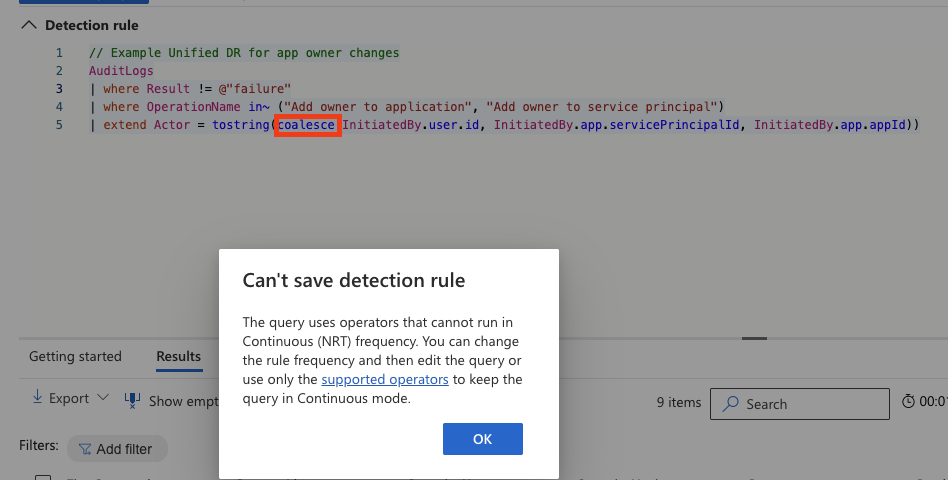
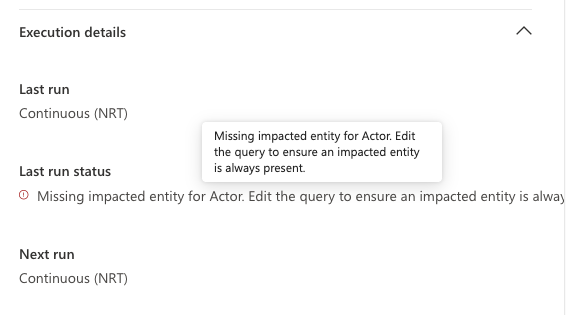
Especially the rule execution failure on empty entity mapping is a critical point to consider, as this can lead to missed detections if not monitored closely.
Auditing and Health Monitoring
While Microsoft Sentinel provides SentinelHealth and SentinelAudit tables to monitor the health and audit logs of detection rules, Defender XDR misses this capability for the health of detections. A bit of information is already surfaced in the portal, but there is no dedicated table in advanced hunting to monitor the health and performance of Unified Detections. This makes it challenging for security teams to track reliability of their detection rules over time.
Modifications and changes to rules are being audited as part of the CloudAppEvents table in Defender XDR:
CloudAppEvents
| where ActionType in (@"CreateCustomDetection", @"EditCustomDetection", @"DeleteCustomDetection")
| extend CustomDetectionRuleName = tostring(RawEventData.RuleName)
| extend RuleId = tostring(RawEventData.RuleId)
| extend UserID = tostring(RawEventData.UserId)
Native Sentinel Data Lake Ingestion for Defender XDR Data
To align with the ‘New Unified Detection Architecture’ illustrated above, we want to avoid the costly dual ingestion of Defender XDR data into Sentinel for detection purposes. With the new Sentinel Data Lake, we can now natively ingest Defender XDR data into the Sentinel Data Lake and query it directly from there for our Unified Detections. This not only simplifies the architecture but also reduces costs associated with data ingestion and storage in Sentinel.
Microsoft announced the native lake ingestion for the following Defender XDR Tables4:
| Defender Workload | Table |
|---|---|
| Defender for Endpoint (MDE) | DeviceInfo |
| DeviceNetworkInfo | |
| DeviceProcessEvents | |
| DeviceNetworkEvents | |
| DeviceFileEvents | |
| DeviceRegistryEvents | |
| DeviceLogonEvents | |
| DeviceImageLoadEvents | |
| DeviceEvents | |
| DeviceFileCertificateInfo | |
| Defender for Office 365 (MDO) | EmailAttachmentInfo |
| EmailEvents | |
| EmailPostDeliveryEvents | |
| EmailUrlInfo | |
| UrlClickEvents | |
| Defender for Cloud Apps (MDA) | CloudAppEvents |
But, before switching table tiers from Analytics, we need to ensure, we have migrated all Sentinel Analytics rules to either Defender XDR custom detections or unified detections.
Identifying Sentinel Analytics Rules Referencing Defender XDR Tables
With a little help of PowerShell and the Az.Accounts module we can query the ARM API for Sentinel Analytics rules and check which of them are referencing the Defender XDR tables that are now natively ingested into the Sentinel Data Lake, to identify potential candidates for migration to Unified Detections and native lake ingestion:
# Check for Sentinel Analytics Rules Referencing Defender XDR Tables with Native Lake Ingestion Capabilities

# Provide your Sentinel workspace details
$subscriptionId = (Get-AzContext).Subscription.Id
$resourceGroupName = '<your-sentinel-resource-group>'
$workspaceName = '<your-sentinel-workspace-name>'
$apiVersion = '2022-11-01-preview'

# GA tables for native lake ingestion from Defender XDR
$lakeAllowedXdrTables = @(
    "DeviceInfo",
    "DeviceNetworkInfo",
    "DeviceProcessEvents",
    "DeviceNetworkEvents",
    "DeviceFileEvents",
    "DeviceRegistryEvents",
    "DeviceLogonEvents",
    "DeviceImageLoadEvents",
    "DeviceEvents",
    "DeviceFileCertificateInfo",
    "EmailAttachmentInfo",
    "EmailEvents",
    "EmailPostDeliveryEvents",
    "EmailUrlInfo",
    "UrlClickEvents",
    "CloudAppEvents"
)

$regex = "\b(" + ($lakeAllowedXdrTables -join "|") + ")\b"

$uri = "https://management.azure.com/subscriptions/{0}/resourceGroups/{1}/providers/Microsoft.OperationalInsights/workspaces/{2}/providers/Microsoft.SecurityInsights/alertRules?api-version={3}" -f $subscriptionId, $resourceGroupName, $workspaceName, $apiVersion
$analyticsRules = Invoke-AzRestMethod -Method Get -Uri $uri | Select-Object -ExpandProperty content | ConvertFrom-Json | Select-Object -ExpandProperty value

# find analytics rules with reference to data lake allowed tables
$analyticsRulesWithLakeAllowedTables = $analyticsRules | ForEach-Object {
  if ($_.properties.query -match $regex ){
      $tableRefs = [regex]::Matches($_.properties.query, $regex).Value -join ", "
      return [PSCustomObject]@{
          RuleName = $_.properties.displayName
          TableReferences = $tableRefs
    }
  }
}

Write-Output "`Deployed Analytics Rules with reference to Defender XDR Tables:`n"
Write-Output $analyticsRulesWithLakeAllowedTables
and tadaa, we get a list of all Sentinel Analytics rules that are referencing the Defender XDR tables that can now be natively ingested into the Sentinel Data Lake, which can be potential candidates for migration to Unified Detections and native lake ingestion:

⚠️ The following dependencies must be manually checked:
- Analytics Rules leveraging ASIM parsers (
_Im_NetworkSession) - Sentinel workbook references
With that, you are good to go and switch the table tiers for tables without any Sentinel Detections: 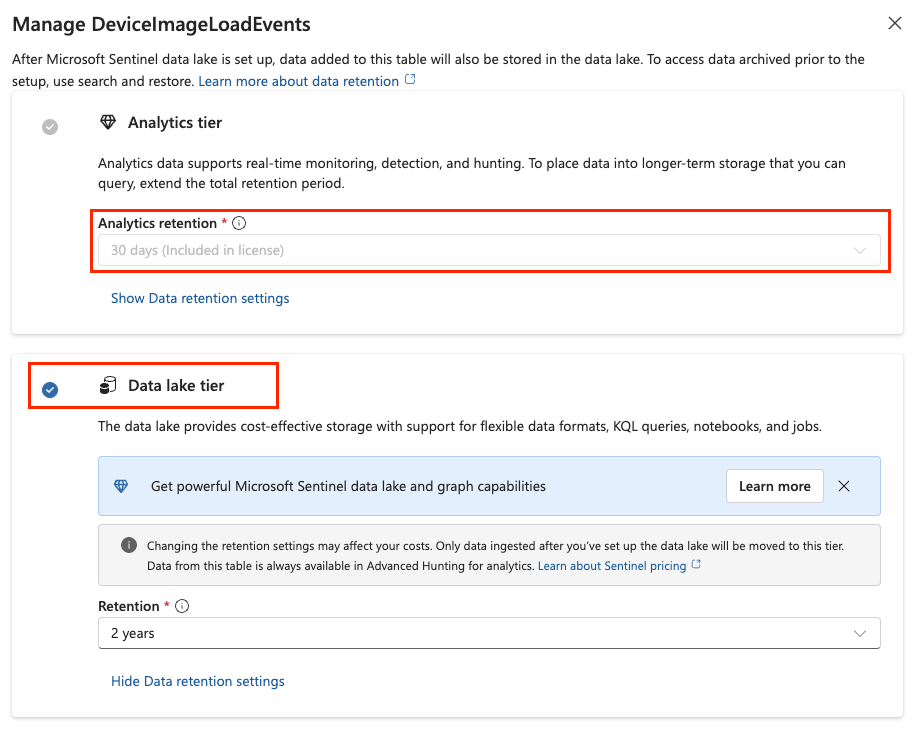
Furthermore, you can also check your SOC optimization dashboard for additional Sentinel tables with low usage to consider for lake tier change as well: 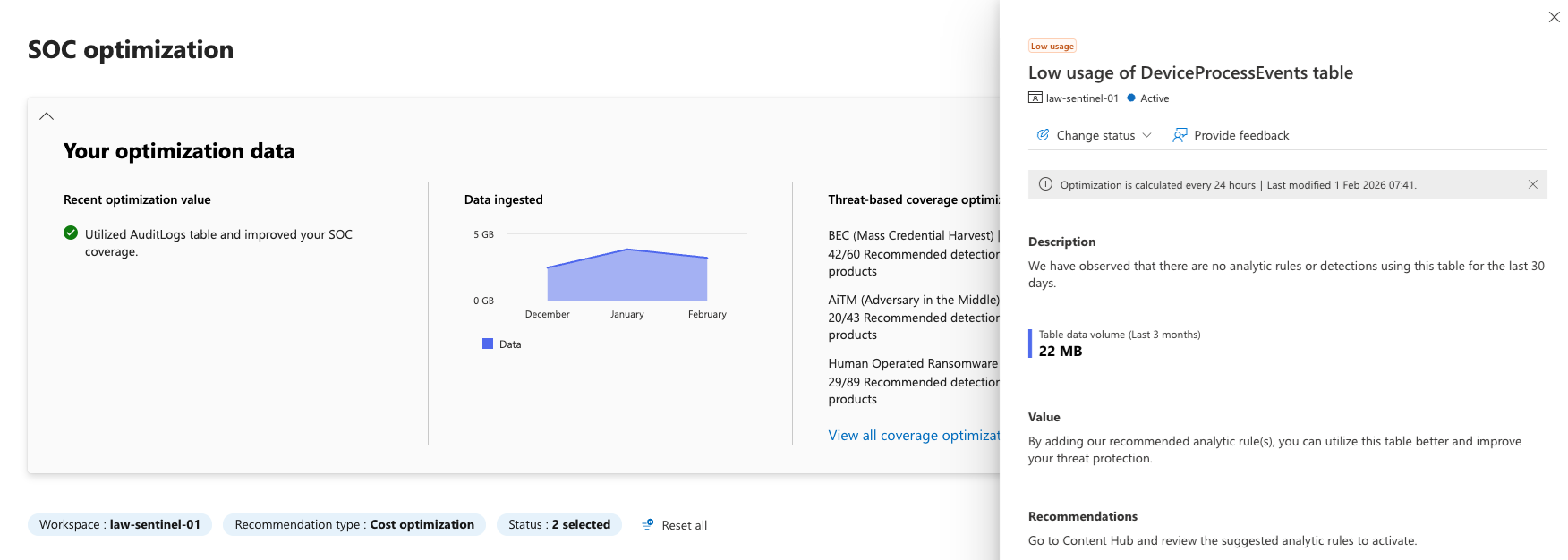
Diving Deeper into Sentinel Data Lake
isLakeAllowed
Interestingly, Microsoft exposes an API property called: isLakeAllowed for all tables, when accessed via the Defender XDR Portal and API Proxy:
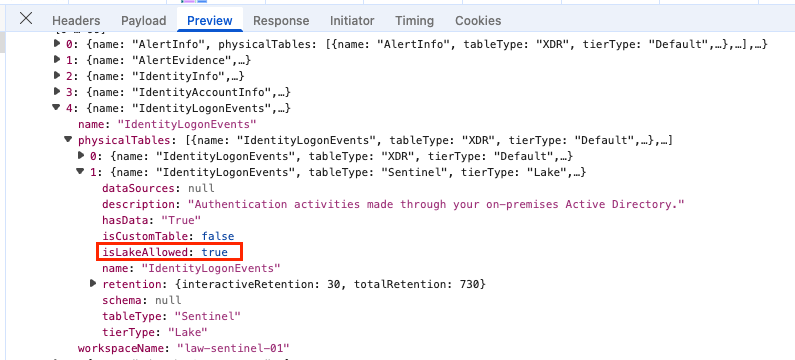
And if we are brave enough to ignore the ‘must’ hint on the Sentinel enabled log analytics workspace and change the tier to ‘Auxiliary’:
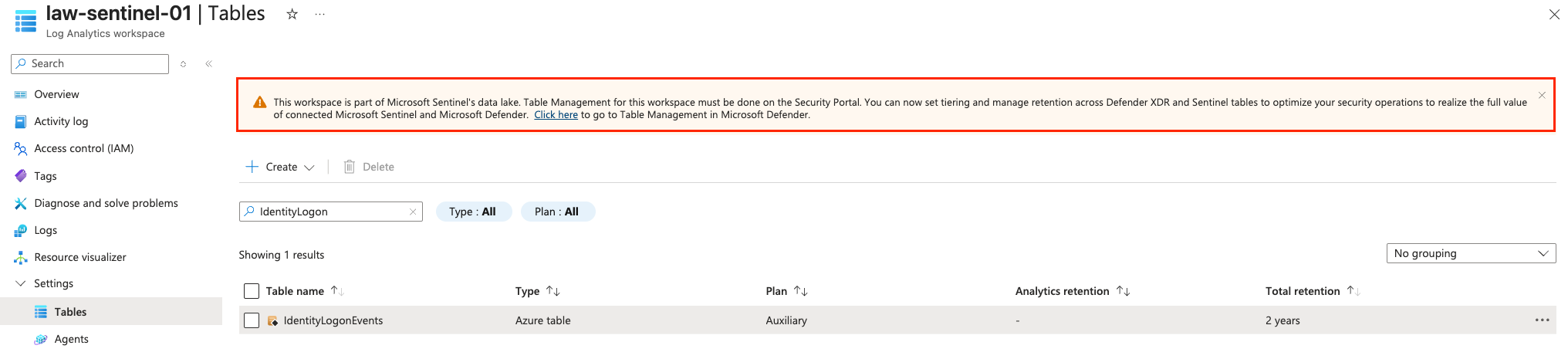
The Defender XDR Portal displays Data Lake as the table tier; despite this table is not yet selectable in the UI:

Unfortunately, data is not yet flowing into the Defender for Identity Tables; Probably because they are heavily linked with other sources and dependencies. But Microsoft promised future support already 4.
A dump of all tables with the isLakeAllowed property is available here: https://github.com/nicolonsky/ITDR/blob/main/Assets/LakeTableSupport.md.
But keep in mind, that this property only indicates if the table is allowed for lake ingestion, but does not necessarily mean that the table is currently supported for direct lake ingestion and Microsoft might change that any time.
Conclusion
The introduction of Unified Detections and native Sentinel Data Lake ingestion for Defender XDR data marks a significant step towards a more streamlined and cost-effective security operations architecture. However, as the feature comparison table and some (personally) opinionated examples illustrate, Unified Detections are not yet at feature parity with Sentinel Analytics rules.
That said, the direction is clear: Microsoft is investing heavily in unifying the detection experience into Defender XDR. For new detections, especially those leveraging Defender XDR tables, Unified Detections should be the default choice. For existing Sentinel Analytics rules, a phased migration approach makes sense—starting with rules that reference Defender XDR tables to unlock the cost benefits of native lake ingestion.
With all those changes related to Unified Security Operations Platform (USOP), Sentinel Data Lake and RBAC changes, it’s crucial for security teams and MSSPs to stay informed and adapt their detection strategies accordingly to leverage the full potential of these new capabilities.
References
- https://learn.microsoft.com/en-us/defender-xdr/custom-detection-rules#microsoft-defender-xdr
- https://learn.microsoft.com/en-us/azure/sentinel/compare-analytics-rules-custom-detections
- https://learn.microsoft.com/en-us/defender-xdr/custom-detection-rules?view=o365-worldwide#custom-frequency-for-microsoft-sentinel-data-preview
- https://techcommunity.microsoft.com/blog/microsoftsentinelblog/data-lake-tier-ingestion-for-microsoft-defender-advanced-hunting-tables-is-now-g/4494206